(800) 564-9281 Request a demo

Trucking MDM that locks down the cab, not the route

Purpose-built mobile device management for commercial fleets. Provision, monitor and secure every driver-facing Android device from one console, with remote support, fleet messaging and video built in.

  • 3 in 1Modules, one console
  • Zero-touchOTA enrollment
  • 24/7In-cab support
  • SOC 2Type II aligned
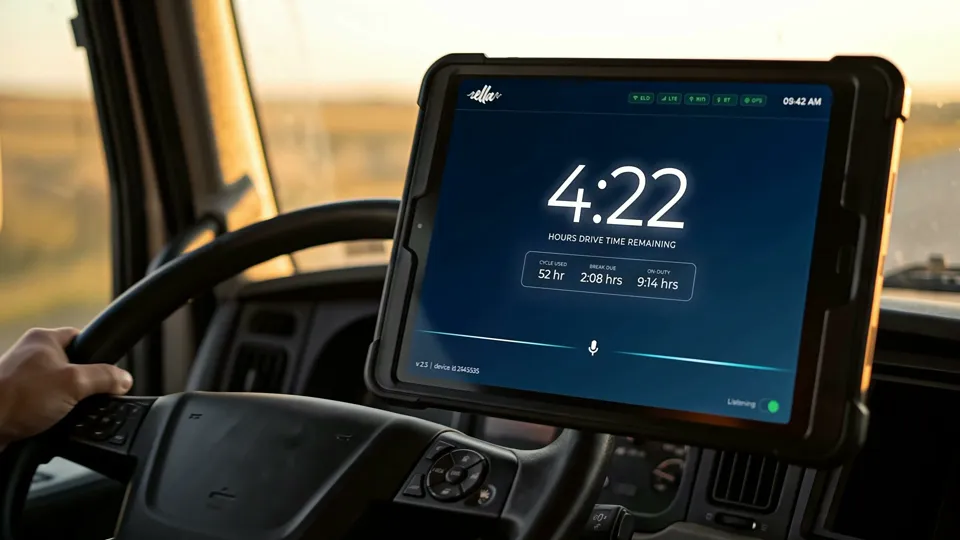
A managed FleetTab tablet on a dash mount in a truck cab, showing the hours of drive time remaining

Three modules, one console

Device Manager keeps every tablet configured and secure. Remote Support gets a driver help from the tablet, without a trip back to the terminal. Fleet Messaging keeps dispatch and drivers talking on the managed device, and goes quiet when the truck moves.

Trucking MDM console Multi-tenant. Every driver device in one view.

Core

Device Manager

  • MDM
  • Kiosk
  • Policy

The control plane for every tablet and phone in your fleet. Push OS updates, enforce app allowlists, lock devices to kiosk mode and set policy by geofence from a single multi-tenant console.

Capabilities

  • Zero-touch enrollment (Android Enterprise, Apple ABM)
  • Remote lock, wipe and factory reset
  • App allowlist and blocklist with silent install
  • Geofenced policy profiles per route or depot
  • Real-time telemetry: battery, connectivity, location
  • REST API and webhooks for TMS integration
  • OS updates and kiosk mode
  • Multi-tenant console

Driver help

Remote Support

  • Remote assist
  • Ticketing

An in-cab help channel that gets a parked driver back on the road without a shop visit. One tap opens a ticket, your team sees the screen and fixes it remotely, and the issue routes to IT or operations.

Capabilities

  • One-tap help from any managed device
  • Attended and unattended remote screen control
  • Device diagnostics attached to every ticket automatically
  • SLA-based routing and escalation workflows
  • Session recording
  • Full session audit log for compliance

Communication

Fleet Messaging

  • Dispatch
  • Push-to-talk

Secure, policy-aware communication between dispatch and drivers. Text, push-to-talk voice and broadcast messages stay inside the managed container, so every conversation is on-platform and auditable.

Capabilities

  • 1:1 and group messaging with read receipts
  • Push-to-talk and broadcast messaging
  • Video conferencing
  • Text-to-speech
  • End-to-end encrypted; messages never leave the tenant
  • Automatically disabled when the vehicle is in motion
  • Retention policies for DOT and FMCSA audits

Policy that follows the truck from depot to route

A tablet on a dash mount has a different job from a phone on a desk. It runs the apps the route needs, follows policy that changes with the depot, and has to be fixable wherever the truck is parked.

  • Kiosk mode keeps the tablet on the apps the job needs.
  • Geofenced profiles change policy per route or depot.
  • Fleet Messaging switches off automatically when the vehicle is in motion.
  • Remote Support lets your team see the screen and resolve the ticket remotely.
  • REST API and webhooks send device events into your TMS.
Illustration of a kiosk-mode tablet: approved apps only, a geofenced depot profile, Fleet Messaging paused while the vehicle moves, and a Remote Support session your team can see.

Bundled with connectivity, set up before it ships

Trucking MDM and the multi-network SIM come together on one month-to-month line item. One SIM, many carriers, one bill.

Connectivity + MDM

$18/ device / month
  • Global multi-network SIM
  • Full Trucking MDM access
  • Month to month, with no separate carrier agreement

Staging, kitting, logistics, training and check-ins are included with every deployment.

Every tablet arrives ready to drive

Each tablet is enrolled in Trucking MDM, permissioned and cellular-tested at our Chicago HUB before it ships. We also train your team on Device Manager, Remote Support and Fleet Messaging.

  1. 01Policy provisioned
  2. 02Permissioned
  3. 03Cellular-tested
  4. 04Shipped from Chicago
See how deployment works

See Trucking MDM run your fleet’s devices.

Tell us how many trucks you run, which apps your drivers use and who your telematics provider is. We reply within one business day.

Call a fleet specialist(800) 564-9281Mon–Fri, 9:00 AM–6:00 PM ET