Phone-based ELD connectivity
When the driver’s phone is the ELD, every link can break
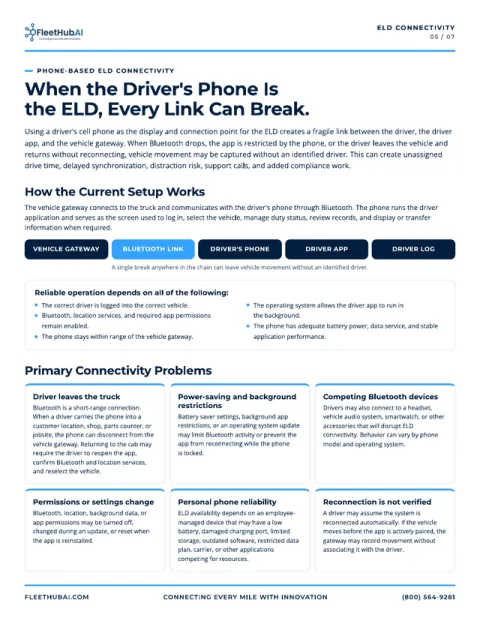
Using a driver’s cell phone as the display and connection point for the ELD creates a fragile link between the driver, the driver app and the vehicle gateway. When that link drops, vehicle movement may be captured without an identified driver.
How the current setup works
The vehicle gateway connects to the truck and communicates with the driver’s phone through Bluetooth. The phone runs the driver application and serves as the screen used to log in, select the vehicle, manage duty status, review records, and display or transfer information when required. If Bluetooth drops, the app is restricted by the phone, or the driver leaves the vehicle and returns without reconnecting, the chain breaks.
Select a link to see what can break it.
Every link holds. Movement is recorded against the driver who is logged in.
A single break anywhere in the chain can leave vehicle movement without an identified driver.
Select any link above to break the chain there and see what causes it.
Vehicle gateway
Connects to the truck and communicates with the driver’s phone through Bluetooth.
What can break here
Reconnection is not verified. A driver may assume the system is reconnected automatically. If the vehicle moves before the app is actively paired, the gateway may record movement without associating it with the driver.
Bluetooth link
Bluetooth is a short-range connection. The phone has to stay within range of the vehicle gateway.
What can break here
- Driver leaves the truck. Carrying the phone into a customer location, shop, parts counter or jobsite can disconnect it from the gateway.
- Competing Bluetooth devices. A headset, vehicle audio system, smartwatch or other accessory can disrupt ELD connectivity.
Driver’s phone
The phone needs adequate battery power, data service and stable application performance.
What can break here
Personal phone reliability. ELD availability depends on an employee-managed device that may have a low battery, damaged charging port, limited storage, outdated software, restricted data plan, carrier, or other applications competing for resources.
Driver app
Bluetooth, location services and required app permissions must stay enabled, and the operating system must allow the app to run in the background.
What can break here
- Power-saving and background restrictions. Battery saver settings or an operating system update may limit Bluetooth activity or stop the app reconnecting while the phone is locked.
- Permissions or settings change. Bluetooth, location, background data or app permissions may be turned off, changed during an update, or reset when the app is reinstalled.
Driver log
The correct driver has to be logged into the correct vehicle for movement to land in the right record.
What a break leads to
Movement captured without an identified driver can create unassigned drive time, delayed synchronization, distraction risk, support calls and added compliance work.
Reliable operation depends on all of the following
Every one of these sits on a phone the driver manages, not the fleet. All five have to hold when the truck moves.
- The correct driver is logged into the correct vehicle.
- Bluetooth, location services and required app permissions remain enabled.
- The phone stays within range of the vehicle gateway.
- The operating system allows the driver app to run in the background.
- The phone has adequate battery power, data service and stable application performance.
Six primary connectivity problems
These are the primary problems behind a dropped phone-based ELD connection. Each one maps to a link in the chain above.
Driver leaves the truck
Bluetooth is a short-range connection. When a driver carries the phone into a customer location, shop, parts counter or jobsite, the phone can disconnect from the vehicle gateway. Returning to the cab may require the driver to reopen the app, confirm Bluetooth and location services, and reselect the vehicle.
Power-saving and background restrictions
Battery saver settings, background app restrictions, or an operating system update may limit Bluetooth activity or prevent the app from reconnecting while the phone is locked.
Competing Bluetooth devices
Drivers may also connect a headset, vehicle audio system, smartwatch or other accessory that can disrupt ELD connectivity. Behavior can vary by phone model and operating system.
Permissions or settings change
Bluetooth, location, background data or app permissions may be turned off, changed during an update, or reset when the app is reinstalled.
Personal phone reliability
ELD availability depends on an employee-managed device that may have a low battery, damaged charging port, limited storage, outdated software, restricted data plan, carrier, or other applications competing for resources.
Reconnection is not verified
A driver may assume the system is reconnected automatically. If the vehicle moves before the app is actively paired, the gateway may record movement without associating it with the driver.
What a dropped connection costs the fleet
The cost of a drop shows up later, in compliance review, dispatch records and roadside inspections.
| Issue | Business effect |
|---|---|
| Unassigned drive time | Vehicle movement can be recorded without an active driver connection. The carrier must investigate and assign the event to the correct driver or document why it remains unassigned. |
| Delayed driver records | Driving information may not appear immediately on the phone. Temporary gaps create uncertainty even if data later synchronizes. |
| Administrative workload | Compliance personnel must research the vehicle, trip time, driver assignment, dispatch information and supporting records. |
| Roadside inspection difficulty | A disconnected, dead, damaged or unavailable phone can make it harder to display records and complete the ELD transfer process. |
| Driver distraction | A driver may try to restore Bluetooth, reopen the app or change settings while moving. Troubleshooting must occur only after parking safely. |
| Inconsistent experience | Phone models, operating systems, carrier settings and personal configurations make troubleshooting less standardized. |
| Employee-owned equipment | The company has less control over device condition, updates, permissions, data availability, and whether the phone is present and charged. |
Compliance considerations
A phone can be part of an ELD. The responsibilities stay the same.
FMCSA permits a smartphone or another wireless device to be part of an ELD system when the system meets the applicable technical requirements. A portable device used as the display must be mounted in a fixed position during CMV operation and visible from the driver’s normal seated position.
The motor carrier must use a registered ELD, support proper login, and manage unassigned driving records under the ELD rule.
Carrier responsibilities that do not change
- Confirm the correct vehicle connection before movement begins.
- Review unassigned driving time and accept or reject it accurately.
- Investigate unassigned records and assign or annotate them as required.
- Follow provider malfunction procedures and carry the required ELD information packet, including blank RODS graph-grids for at least eight days.
Eight controls for reliable ELD connectivity
Recommended controls for fleets running ELDs on drivers’ phones or on dedicated tablets. Several are policy and training, not hardware.
Standardize the device
Use a company-managed tablet or dedicated display where practical to reduce variation in hardware, software, settings, data plans, chargers and competing Bluetooth connections.
Use a pre-trip connection check
Before moving, confirm the correct account and vehicle, Bluetooth, location services, gateway connection, charging and duty status.
Require safe troubleshooting
Never troubleshoot while driving. Stop in a safe location before correcting a connection issue.
Protect application settings
On managed devices, maintain updates, background activity, required permissions and battery settings that allow the app to operate.
Separate ELD use from calls
When testing confirms a conflict, use a dedicated ELD tablet or a standardized hands-free solution that does not disrupt the gateway connection.
Review unassigned events daily
Identify recurring drivers, trucks, phone models, locations or conditions tied to unassigned drive time.
Document repeated failures
Record driver ID, truck ID, date and time, phone model, app version, and what occurred when the disconnect happened.
Train drivers and supervisors
Explain that Bluetooth is short range, reconnection may require driver action, and the truck should not move until the correct vehicle connection is confirmed.
How FleetHub.AI closes the gap
A cell-phone-based ELD can meet regulatory requirements, but it rests recordkeeping on a fragile connection. Standardized, company-managed devices provide a more reliable approach.
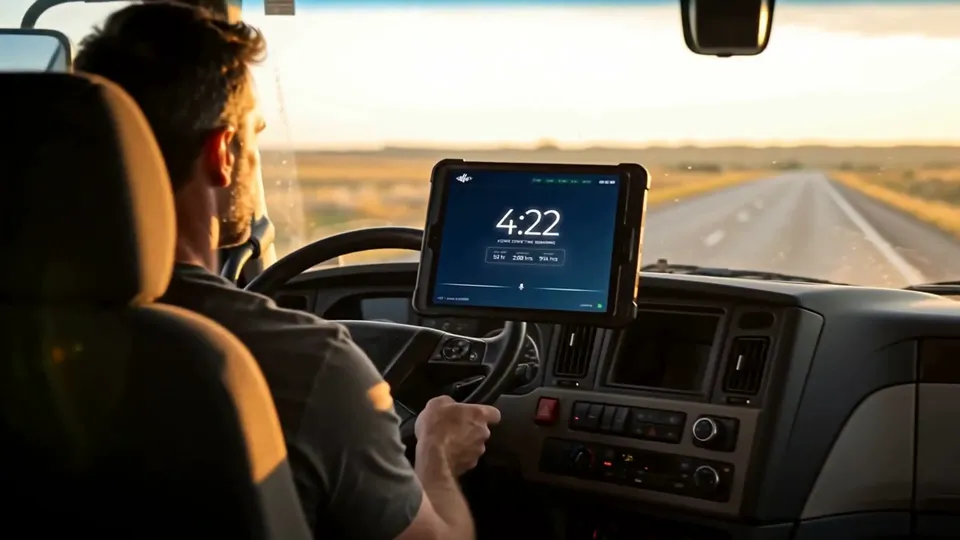
- FleetTab hardware Dedicated in-cab tablet FleetTab T80 and T105 stay mounted in the cab and paired to the gateway, so the ELD never leaves the truck with the driver.
- Trucking MDM Locked-down settings Trucking MDM enforces Bluetooth, location, background activity, battery and app permissions, and controls updates.
- Connectivity Multi-network connectivity The physical multi-network SIM attaches to the strongest available carrier and reconnects on its own after a drop, with no Wi-Fi needed, so records sync without depending on a personal data plan.
- Deployment Staged and tested Every device is provisioned, paired and cellular-tested at the Chicago HUB before it ships, backed by a 24-hour RMA and a 12-month warranty.
Free guide
Take the full guide back to your safety team
The FleetHub.AI fleet mobility and ELD reliability guide covers the platform, device management, deployment, connectivity and pricing, plus the three ELD pages summarized here: the connection chain, the cost of a dropped connection, and the eight controls.
Sources
- FMCSA: General information about the ELD rule
- FMCSA ELD portal (eld.fmcsa.dot.gov)
- 49 CFR Part 395, Subpart B (ecfr.gov)
This page summarizes general operational considerations for ELD connectivity. It is not legal advice. Confirm your obligations against the FMCSA sources above and your ELD provider’s procedures.
Next step
Keep the ELD in the truck.
Tell us about your trucks, routes and telematics provider. We’ll show you what a dedicated, managed in-cab tablet looks like for your fleet, and reply within one business day.